
In the previous article on Angular.love, we covered the foundational mechanics of Claude Skills and how they prevent language models from polluting modern codebases with legacy patterns. Left to its own devices, an LLM will confidently generate an Angular 8 component complete with constructor injection and a dedicated module file. We solved this previously by writing our own skills or relying on community packages.
Recently, the Angular core team merged the official angular-developer skill directly into the main framework repository. I will break down how this official skill is architected, why it utilizes an orchestrator pattern rather than a modular approach, and how we integrate it into a standard development workflow.

Choosing an Agent Context Strategy
When establishing codebase conventions for an agent, we must decide how to structure the injected context. We have a few alternatives: project-level CLAUDE.md files, modular community skills (like the AnalogJS collection), or the official unified skill. Here is how they compare.
If we use a massive CLAUDE.md file, we consume a large portion of our context window on every prompt, even when the rules are irrelevant to the current task. If we use the AnalogJS modular skills, we have to manually install and manage 10 separate packages (angular-signals, angular-ssr, etc.).
The official Angular skill takes a different approach: it operates as a single orchestrator. Using the official orchestrator as the global baseline for all v20+ projects maintains a cohesive, framework-aligned set of rules out of the box, while keeping token usage strictly limited to the domain at hand. We then reserve CLAUDE.md strictly for project-specific state management choices or internal folder conventions.
Architecture Breakdown
The fundamental problem with agent instructions is progressive disclosure. We cannot load 30 pages of API documentation into the prompt concurrently. The official Angular skill solves this by structuring the skill as a router. The entry point is a lean SKILL.md file that defines the tool capabilities and acts as a dependency graph to over 30 specific markdown reference files located in a references/ subdirectory.
When Claude initializes, it only reads the YAML frontmatter.
---
name: angular-developer
description: Expert Angular developer skill. Use this for any Angular-related tasks, including component creation, routing, forms, signals, and testing.
---
When we issue a prompt related to routing, Claude parses the SKILL.md body and determines it needs to read define-routes.md and loading-strategies.md. The other 28 files, such as reactive-forms.md or component-harnesses.md, remain unloaded. This ensures the agent has deep technical context for the specific task without token bloat.
Implementation Details
Let us configure the local environment to use the official Angular team skill. We will use the Vercel skills CLI to handle the installation and remote synchronization.
We install the skill by pointing the CLI directly to the Angular skills repo.
npx skills add angular/skillsNote that angular/skills is a snapshot repository. The original content lives in the main repo. Whenever there is a change there, it publishes a snapshot as a new commit.
The CLI handles the file placement using a symlink architecture. It downloads the canonical skill files into a global .agents/skills/angular-developer/ directory, and then creates a symlink at .claude/skills/angular-developer/ pointing to that global store.
Validating Skill Activation
We have two ways to verify a skill is functioning: triggering a test prompt and reading the execution trace, or directly querying the agent’s current state. While a test prompt is useful for verifying output, it consumes tokens.
Claude Code provides internal diagnostic commands. Instead of guessing if the angular-developer orchestrator loaded correctly from the .claude/skills symlink, we can query the active session state using /context.
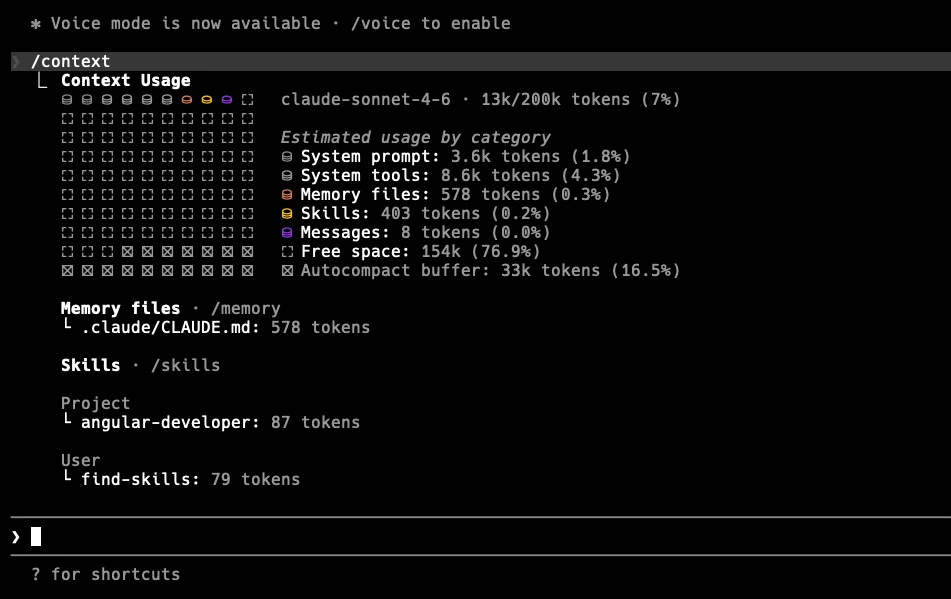
How It Improves Code Quality and Agent Workflow
The most critical feature of the official skill is its autonomous verification loop. Generating code is only half the problem; verifying it compiles against the current workspace typescript configuration is the other.
The official skill strictly mandates that Claude runs ng build after generating or modifying files. We can observe this behavior by prompting the agent to generate a component with an intentional omission.
claude "Create a simple user list component that accepts a list of users as input and emits a selected user event."Claude will generate the file using the modern input() function, adhering to the skill’s rule against @Input() decorators. Immediately after writing the file to disk, the skill forces the agent to execute a shell command.
The terminal output will show the subagent lifecycle executing:
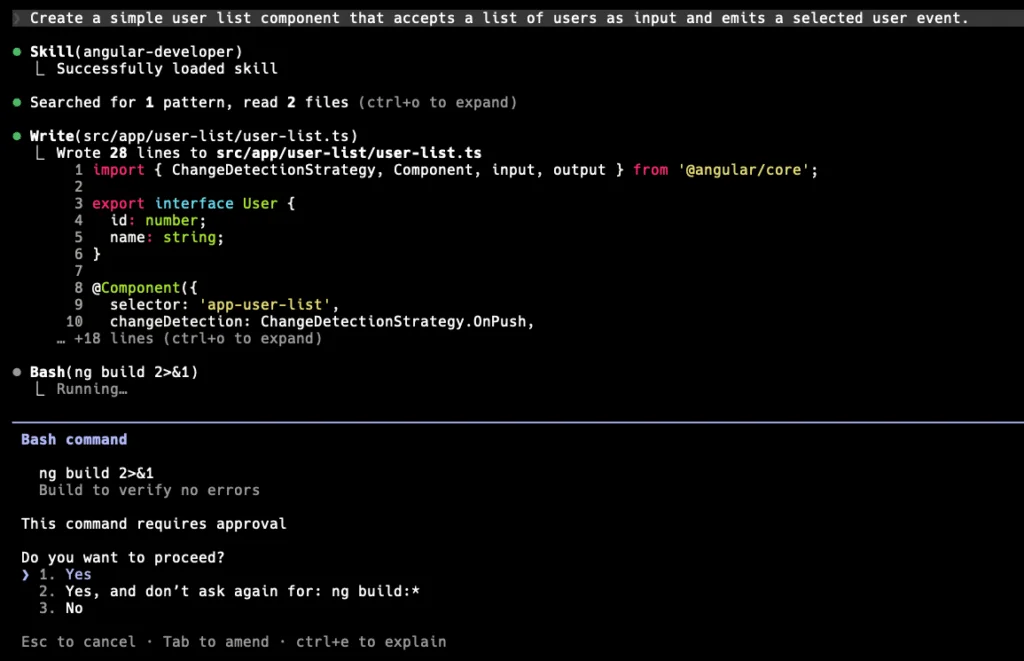
The agent parses the compilation error, corrects its own missing import, and verifies the fix before returning control to the terminal.
Maintaining the Context Baseline
How do we prevent the agent’s knowledge from rotting as the framework evolves? Angular ships minor releases frequently. If your local agent relies on a stale version of the angular-developer skill, it will eventually revert to generating outdated patterns.
The skills CLI handles versioning by maintaining a .skill-lock.json file. This file tracks the skillFolderHash of your installed skills against the upstream repository.
We check for drift and apply updates directly through the terminal.
# Evaluate the local hash against the remote main branch
npx skills check
# Apply the updates interactively
npx skills update
You can automate this process. You do not want to rely on developers remembering to manually pull skill updates. For example, set up a weekly CI/CD pipeline job that runs npx skills update --yes and automatically opens a pull request against your repository if the .skill-lock.json changes.
Layering Project Context
Because the official skill enforces framework-level rules (e.g., using @if instead of *ngIf, avoiding standalone: true as it is default in v20), we must handle our project-level architectural decisions separately.
We do this by creating a highly concise CLAUDE.md in the workspace root. Since the official skill handles the Angular API surface, our CLAUDE.md only needs to define our domain constraints.
## Architecture
- We use NgRx SignalStore for all state management. Never use RxJS BehaviorSubjects for local state.
- Feature modules follow the feature-driven directory structure: `src/app/features/[feature-name]/`.

## Testing
- We use Vitest. Do not generate Karma or Jasmine configuration files.
- All components must have a corresponding `.spec.ts` file utilizing Angular Testing Library, not standard TestBed fixture methods.
By combining the official angular-developer orchestrator skill with a strict, 10-line CLAUDE.md file, we create a bounded environment where the agent outputs structurally sound, compiling, and architecturally compliant code.
Summary
You should use the official angular-developer skill as the mandatory baseline for any v20+ workspace. It directly reflects how the Angular core team wants us to write code in a standard way. By offloading framework-level syntax constraints to the official repository, we stop fighting Claude’s outdated training weights.